Android Sandbox
Android system sandbox
Lybic provides an Android GUI sandbox that lets developers create and manage cloud-hosted virtual Android devices. These sandboxes can be used to test and run Android-based agent applications.
Sandbox Specifications
Standard users can choose from different specs to fit their task needs. The following are the default Android sandbox specs available to regular users. If you need additional configurations (e.g., a higher Android version), please contact our business team:
| Spec Name | CPU Cores | Memory | Disk Space | ShapeID | Billing Multiplier | Use Case Description |
|---|---|---|---|---|---|---|
| Standard Android 12 Sandbox – Shenzhen | 4 | 6GB | 37GB | acep-shenzhen-enhanced | 0.5x | Ideal for lightweight data collection and low-risk scenarios |
| Standard Android 12 Sandbox – Wenzhou | 3 | 5.3GB | 64GB | acep-wenzhou-common-pro | 0.5x | Ideal for lightweight data collection and low-risk scenarios |
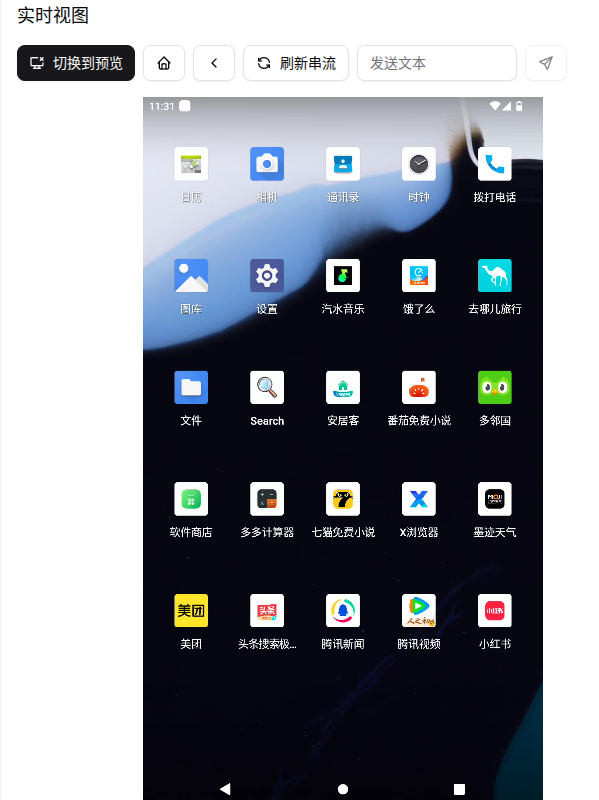
Preinstalled Software
The Android sandbox comes with a set of commonly used third-party apps so that users and agents can develop, test, and operate more conveniently. Below is the list of preinstalled third-party software:
| App Name | Category | Version | Package Name | Notes |
|---|---|---|---|---|
| Meituan | Lifestyle | 12.49.404 | com.sankuai.meituan | |
| 汽水音乐 | Music Player | 17.6.0 | com.luna.music | |
| Duolingo | Learning | 6.60.5 | com.duolingo | |
| App Market | App Marketplace | 12.15.0 | com.heytap.market | |
| ele.me | Lifestyle | 11.28.68 | me.ele | |
| rednote | Social Media | 8.71.0 | com.xingin.xhs | |
| iDO Calculators | Tools | 3.8.5 | com.ibox.calculators | |
| 安居客 | Real Estate | 17.30.0 | com.anjuke.android.app | |
| 腾讯视频 | Video Player | 9.02.85.31078 | com.tencent.qqlive | |
| 头条搜索极速版 | News & Info | 10.0.4.0 | com.ss.android.article.lite | |
| 知乎 | Knowledge | 10.82.0 | com.zhihu.android | |
| 番茄免费小说 | Reading | 7.0.1.32 | com.tomato.freenovel | |
| Qunar Travel | Travel Service | 10.4.9 | com.Qunar | |
| 腾讯新闻 | News & Info | 7.8.50 | com.tencent.news | |
| XBrowser | Browser | 5.5.0 | com.mmbox.xbrowser | |
| 七猫免费小说 | Reading | 7.88 | com.kmxs.reader | |
| 墨迹天气 | Weather | 9.0924.02 | com.moji.mjweather |
System software:
| App Name | Category | Package Name | Notes |
|---|---|---|---|
| Files | File Manager | com.android.documentsui | |
| Settings | System Settings | com.android.settings | |
| Camera | Camera App | com.android.camera2 | |
| Contacts | Contacts | com.android.contacts | |
| Phone | Dialer | com.android.dialer | |
| Gallery | Image Viewer | com.android.gallery3d | |
| WebView Shell | Browser Engine | org.chromium.webview_shell | |
| Clock | Clock App | com.android.deskclock | |
| Search | System Search | com.android.quicksearchbox | |
| Calendar | Calendar App | com.android.calendar |
Explore
Setting Android Sandbox GPS Location
Apk Installation in Android Sandbox
App Installation via App ID in Android Sandbox
Using the Android Sandbox
You can create and manage Android sandbox instances via the console or through the Lybic API (SDK). After creating a sandbox, connect to the Android desktop environment interactively through the lybic Console, lybic Streaming SDK, or lybic Streaming iframe to write code, test, and debug.
Note:
- Security and Risk Control: Due to the complex Android risk control mechanisms, some applications may not function properly. If you encounter such problems, please try using a different application or contact the Lybic support team for assistance.
- Language Environment: The Android sandbox defaults to a Chinese language environment. Some applications may display different interfaces depending on the system language. When you change the system language, the PackageManager API will still return Chinese application names and interface element text, which will affect the Lybic API and may affect your agent's interaction and operation. It is recommended to keep the system language set to Chinese during use to ensure that the agent can correctly identify and operate the application interface; or restart the system after changing the language to ensure that the PackageManager API returns the correct application names and interface element text.