Custom Image Management
You can tailor your sandbox system image based on an existing running sandbox, preinstalling the software and configurations you need to streamline sandbox creation and usage for your workflows. This guide explains how to create, manage, and use custom images.
Tips:
- Custom images are currently supported for Windows sandboxes only.
- Images that remain unused for more than 30 days are automatically deleted, so be sure to use them before then.
- Basic plans allow each organization to create up to 3 custom images. Contact our business team if you need more.
Managing Custom Images via the Console
Create
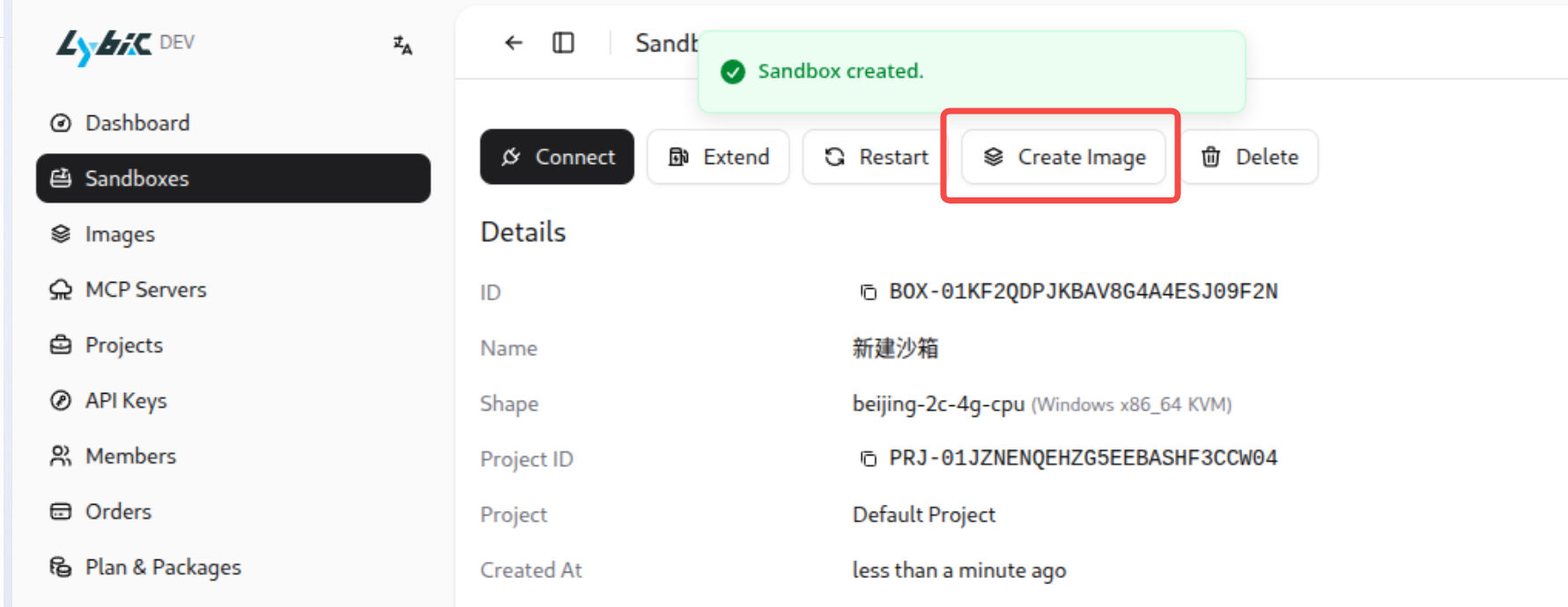
Open the sandbox details page, click “Create Image,” provide a name and description, and click “Create Image.” Wait while the system snapshots the current sandbox file state to generate the custom image, then removes the original sandbox.
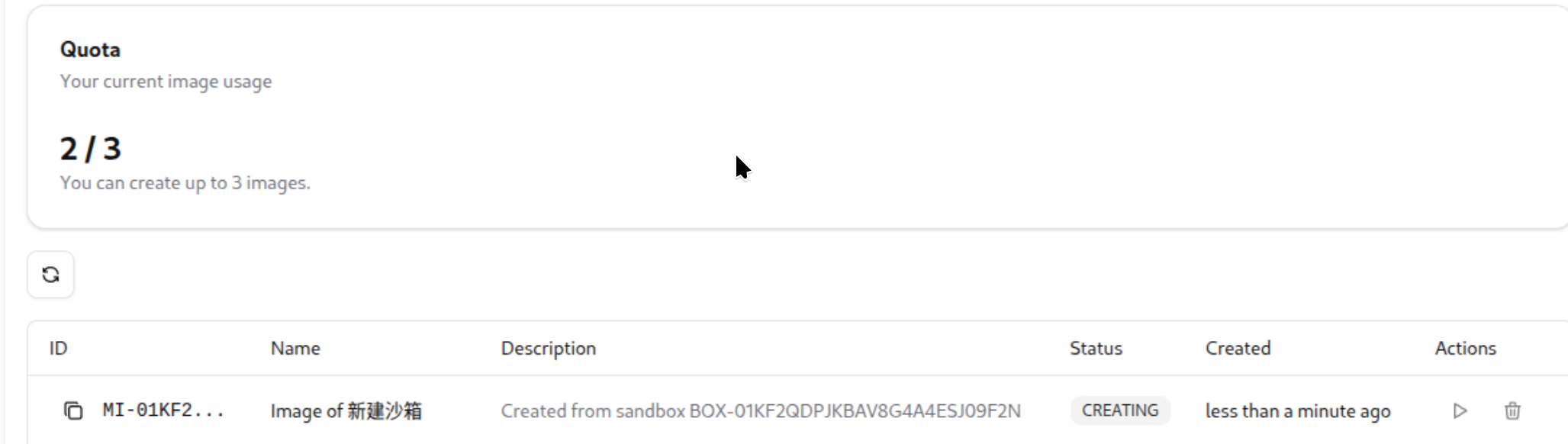
On the “Images” management page you can view and manage your custom images via the actions on the right.
Delete
On the “Images” page, find the image you want to remove, click the delete icon on the right, and confirm to delete it.
Managing Custom Images via API
Use the following API endpoints to manage custom images. All requests must include an API key in the header for authentication.
1. Create Image
Create a custom image from an existing sandbox. The source sandbox is deleted after the image is created.
Endpoint: POST /api/orgs/{orgId}/machine-images
Request Parameters:
sandboxId(string, required): Sandbox ID to base the image onname(string, required): Image name (1–100 characters)description(string, optional): Image description (up to 500 characters)
Request Examples:
curl -X POST "https://api.lybic.cn/api/orgs/{orgId}/machine-images" \
  -H "Content-Type: application/json" \
  -H "Authorization: Bearer YOUR_API_KEY" \
  -d '{
    "sandboxId": "sandbox_123",
    "name": "My Custom Image",
    "description": "Ubuntu with Node.js and Python pre-installed"
  }'
import asyncio
from lybic import LybicClient, LybicAuth
async def main():
async with LybicClient(
LybicAuth(
org_id="ORG-xxxx",
api_key="lysk-xxxxxxxxxxx",
endpoint="https://api.lybic.cn/"
)
) as client:
image = await client.sandbox.create_machine_image(
sandboxId="sandbox_123",
name="My Custom Image",
description="Ubuntu with Node.js and Python pre-installed"
)
print(f"Image created: {image.id}, status: {image.status}")
if __name__ == "__main__":
asyncio.run(main())import { LybicClient } from '@lybic/core'
const lybic = new LybicClient({
baseUrl: 'https://api.lybic.cn',
orgId: 'ORG-xxxx',
apiKey: 'lysk-your-api-key-here',
})
const result = await lybic.client.POST('/api/orgs/{orgId}/machine-images', {
params: {
path: {
orgId: lybic.orgId,
},
},
body: {
sandboxId: 'sandbox_123',
name: 'My Custom Image',
description: 'Ubuntu with Node.js and Python pre-installed',
},
})
console.log(`Image created: ${result.data?.id}, status: ${result.data?.status}`)package main
import (
"context"
"fmt"
"github.com/lybic/lybic-sdk-go"
)
func main() {
ctx := context.Background()
client, _ := lybic.NewClient(nil)
description := "Ubuntu with Node.js and Python pre-installed"
imageDto := lybic.CreateMachineImageDto{
SandboxId: "sandbox_123",
Name: "My Custom Image",
Description: &description,
}
image, err := client.CreateMachineImage(ctx, imageDto)
if err != nil {
fmt.Println("Error creating machine image:", err)
return
}
fmt.Printf("Image created: %s, status: %s\n", image.Id, image.Status)
}Response Example:
{
  "id": "img_abc123",
  "name": "My Custom Image",
  "description": "Ubuntu with Node.js and Python pre-installed",
  "createdAt": "2026-01-16T06:30:00.000Z",
  "shapeName": "linux-small",
  "status": "CREATING"
}
Status Meanings:
CREATING: Image is being createdREADY: Image is ready to useERROR: Image creation failed
2. List Images
Retrieve all custom images for your organization.
Endpoint: GET /api/orgs/{orgId}/machine-images
Request Examples:
curl -X GET "https://api.lybic.cn/api/orgs/{orgId}/machine-images" \
  -H "Authorization: Bearer YOUR_API_KEY"
import asyncio
from lybic import LybicClient, LybicAuth
async def main():
async with LybicClient(
LybicAuth(
org_id="ORG-xxxx",
api_key="lysk-xxxxxxxxxxx",
endpoint="https://api.lybic.cn/"
)
) as client:
images = await client.sandbox.list_machine_images()
for image in images.images:
print(f"Image ID: {image.id}, name: {image.name}, status: {image.status}")
if __name__ == "__main__":
asyncio.run(main())import { LybicClient } from '@lybic/core'
const lybic = new LybicClient({
baseUrl: 'https://api.lybic.cn',
orgId: 'ORG-xxxx',
apiKey: 'lysk-your-api-key-here',
})
const result = await lybic.client.GET('/api/orgs/{orgId}/machine-images', {
params: {
path: {
orgId: lybic.orgId,
},
},
})
result.data?.images?.forEach((image) => {
console.log(`Image ID: ${image.id}, name: ${image.name}, status: ${image.status}`)
})package main
import (
"context"
"fmt"
"github.com/lybic/lybic-sdk-go"
)
func main() {
ctx := context.Background()
client, _ := lybic.NewClient(nil)
images, err := client.ListMachineImages(ctx)
if err != nil {
fmt.Println("Error listing machine images:", err)
return
}
for _, image := range images {
fmt.Printf("Image ID: %s, name: %s, status: %s\n", image.Id, image.Name, image.Status)
}
}Response Example:
{
  "images": [
    {
      "id": "img_abc123",
      "name": "My Custom Image",
      "description": "Ubuntu with Node.js and Python pre-installed",
      "createdAt": "2026-01-16T06:30:00.000Z",
      "shapeName": "linux-small",
      "status": "READY"
    },
    {
      "id": "img_def456",
      "name": "Windows Dev Environment",
      "description": "Windows with Visual Studio",
      "createdAt": "2026-01-15T10:20:00.000Z",
      "shapeName": "windows-medium",
      "status": "READY"
    }
  ]
}
3. Create Sandbox from Image
Use a custom image to launch a new sandbox instance.
Endpoint: POST /api/orgs/{orgId}/sandboxes/from-image
Request Parameters:
imageId(string, required): Image IDname(string, required): Sandbox name (1–100 characters)maxLifeSeconds(integer, required): Maximum sandbox lifetime in seconds (min 300, max 604800 / 7 days)projectId(string, optional): Project ID (defaults to the default project if omitted)
Request Examples:
curl -X POST "https://api.lybic.cn/api/orgs/{orgId}/sandboxes/from-image" \
  -H "Content-Type: application/json" \
  -H "Authorization: Bearer YOUR_API_KEY" \
  -d '{
    "imageId": "img_abc123",
    "name": "Development Sandbox",
    "maxLifeSeconds": 7200
  }'
import asyncio
from lybic import LybicClient, LybicAuth
async def main():
async with LybicClient(
LybicAuth(
org_id="ORG-xxxx",
api_key="lysk-xxxxxxxxxxx",
endpoint="https://api.lybic.cn/"
)
) as client:
sandbox = await client.sandbox.create_from_image(
imageId="img_abc123",
name="Development Sandbox",
maxLifeSeconds=7200
)
print(f"Sandbox created: {sandbox.id}, status: {sandbox.status}")
if __name__ == "__main__":
asyncio.run(main())import { LybicClient } from '@lybic/core'
const lybic = new LybicClient({
baseUrl: 'https://api.lybic.cn',
orgId: 'ORG-xxxx',
apiKey: 'lysk-your-api-key-here',
})
const result = await lybic.client.POST('/api/orgs/{orgId}/sandboxes/from-image', {
params: {
path: {
orgId: lybic.orgId,
},
},
body: {
imageId: 'img_abc123',
name: 'Development Sandbox',
maxLifeSeconds: 7200,
},
})
console.log(`Sandbox created: ${result.data?.sandbox?.id}, status: ${result.data?.sandbox?.status}`)package main
import (
"context"
"fmt"
"github.com/lybic/lybic-sdk-go"
)
func main() {
ctx := context.Background()
client, _ := lybic.NewClient(nil)
var maxLife int32 = 7200
sandboxDto := lybic.CreateSandboxFromImageDto{
ImageId: "img_abc123",
Name: "Development Sandbox",
MaxLifeSeconds: maxLife,
}
sandbox, err := client.CreateSandboxFromImage(ctx, sandboxDto)
if err != nil {
fmt.Println("Error creating sandbox from image:", err)
return
}
fmt.Printf("Sandbox created: %s, status: %s\n", sandbox.Id, sandbox.Status)
}Response Example:
{
  "sandbox": {
    "id": "sandbox_xyz789",
    "name": "Development Sandbox",
    "status": "CREATING",
    "createdAt": "2026-01-16T06:35:00.000Z",
    "imageId": "img_abc123"
  }
}
4. Delete Image
Delete a custom image to prevent further sandbox creation from it.
Endpoint: DELETE /api/orgs/{orgId}/machine-images/{imageId}
Path Parameter:
imageId(string, required): ID of the image to delete
Request Examples:
curl -X DELETE "https://api.lybic.cn/api/orgs/{orgId}/machine-images/img_abc123" \
  -H "Authorization: Bearer YOUR_API_KEY"
import asyncio
from lybic import LybicClient, LybicAuth
async def main():
async with LybicClient(
LybicAuth(
org_id="ORG-xxxx",
api_key="lysk-xxxxxxxxxxx",
endpoint="https://api.lybic.cn/"
)
) as client:
await client.sandbox.delete_machine_image(image_id="img_abc123")
print("Image deleted successfully")
if __name__ == "__main__":
asyncio.run(main())import { LybicClient } from '@lybic/core'
const lybic = new LybicClient({
baseUrl: 'https://api.lybic.cn',
orgId: 'ORG-xxxx',
apiKey: 'lysk-your-api-key-here',
})
await lybic.client.DELETE('/api/orgs/{orgId}/machine-images/{imageId}', {
params: {
path: {
orgId: lybic.orgId,
imageId: 'img_abc123',
},
},
})
console.log('Image deleted successfully')package main
import (
"context"
"fmt"
"github.com/lybic/lybic-sdk-go"
)
func main() {
ctx := context.Background()
client, _ := lybic.NewClient(nil)
err := client.DeleteMachineImage(ctx, "img_abc123")
if err != nil {
fmt.Println("Error deleting machine image:", err)
return
}
fmt.Println("Image deleted successfully")
}Response: HTTP 204 No Content (success)
Usage Notes
- Replace placeholders: Update
{orgId},YOUR_API_KEY,sandbox_123, and other placeholders with real values when using the examples. - Image readiness: Wait for the image status to become
READYbefore using it to create a sandbox.